Switch to a window manager
2025-12-03
Preface
I hate floating windows. That's why I use a tiling window manager. I’ll go over why tiling window managers (TWMs) in my opinion beat traditional desktop environments (DEs) like macOS, Windows, GNOME and KDE in terms of comfort, customizability and productivity for programmers!
This article primarily concerns Linux but there are other articles on the alternatives for macOS (Yabai) and Windows (Komorebi, FancyWM)
- What are Tiling Window Managers?
1.1 Benefits over a traditional desktop environment - Surviving without a desktop environment
2.2 Configuration - What tiling window manager to choose?
What are Tiling window managers?
Tiling window managers automatically organize your windows into tiles. Unlike traditional desktops that use floating windows. You don’t need to manually drag or resize them, which reduces reliance on the mouse and can significantly speed up your workflow.
Tiling window managers are of course window managers, which means they often times come with minimal or no external software such as a calculator or a GUI to update your packages. This is where a lot of people have a hard time switching from a Desktop Environment which bundles both a window manager and "quality of life applications".
On Linux, window managment works differently depending on whether you're using X11 or Wayland. Under X11, you have a separate display server and a window manager (such as i3wm, bspwm or qtile) that controls window placement, behavior and decorations like the titlebar or shadows. Under Wayland, the display server and window-management functionality are combined into a single component called the compositor, which is responsible for input handling, window management, and rendering.
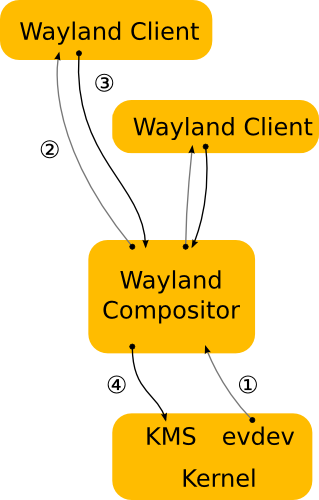
Basically what you should know is that X11 is old and Wayland is the newer guy who is supposed to replace X11 in the future, though X11 is still widely used and developed on.

Benefits over a traditional desktop environment
1. TWMs enable greater control of windows. Being able to primarily utilize the keyboard instead of trying to drag windows or desktop environment specific keybinds for primitive tiling. All of these factor into a more productive workflow without distractions.

Demo of navigation in DWM
2. Comfort is an incredibly important part of the daily use of a computer. Workplaces often advocate proper ergonomic hygiene but the operating system itself is practically always disregarded.
3. Greater benefit from muscle memory with a more intuitive way of navigating on your computer. When you can use a super simple and quick shortcut you don't have to worry about eye-to-hand movement and neurons firing off over looking for a window. Helps concentration.
A con is that you need to learn the navigation for it to become muscle memory, expect to bypass regular DE speed within a week
4. The lack of preinstalled software prompts the user to hopefully create an opinionated setup. Having something thats tailored to your own needs and interests is crucial for me and I think this should be a more common practice. Do it once and its great for a long term.
Content creator Primeagen has a great short segment on Window Managers and their benefits in the timestamped linked:
Developer Productivity, v2 with ThePrimeagen | Preview
Surviving without a desktop environment
So how do you manage without the huge amount of applications that you would presumably lack in a tiling window manager?
If you already have a desktop environment installed you can install a TWM of your choice and your applications will work without problems 99% of the time as long as they both share the same display protocol (Wayland/X11)
Configuration
Most TWM already ship with the very essentials, like a terminal and a statusbar, but some do not. If you are on a brand new install you can install these via your package manager and configure your TWM to use these for your shortcuts.
Most tiling window managers store their settings in a .config directory, where you can edit files to:
- Define keybindings for opening, closing, and moving windows and other shortcuts such as opening a browser
- Set window layouts and default behaviors
- Configure status bars, workspaces, and notifications
- Integrate favorite applications into your workflow
Note: other applications will have their own configuration files and locations accordingly
Luckily there is an incredible amount of resources on top of the documentation that each window manager provides. Search engine is your best friend.
Examples of default configuration files provided by different window managers:
Sway, Wayland
Hyrpland, Wayland
i3wm, X11
DWM, X11
What tiling window manager to choose?
If you are interested in tiling window managers, the best way to pick is based on if you use X11 or Wayland.
For X11, i3wm is the simplest tiling window manager and in my opinion one of the best to use. Configuration is pretty straightforward and the default configuration is good.
If you are on Wayland then Sway is basically the same as i3wm but supported for Wayland, thus a great option.
If you want more flare and animations then Hyprland is a great option.
Arch Wiki is a great resource for information regarding the different window managers available, here are a few links:
Window Managers, i3wm, Hyprland,